Argus [ElevenX]
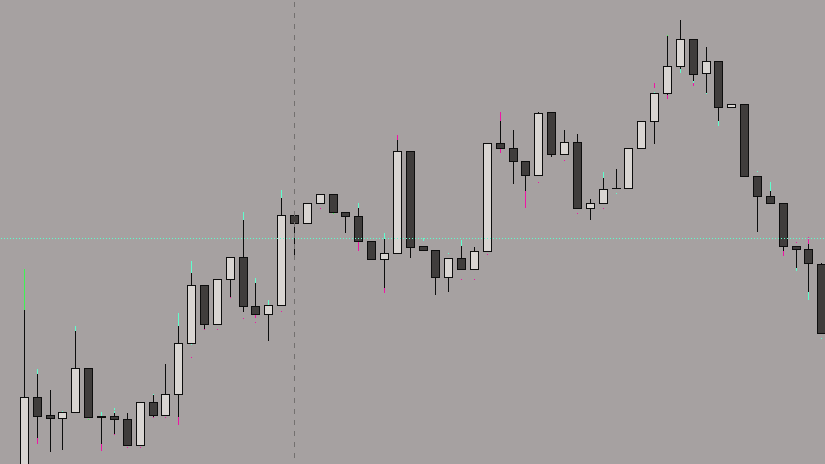
Argus Argus lets you visualize and compare multiple exchanges on the same chart - real-time, side-by-side, fully customizable.
Key Features
- Multi-Exchange Comparison: Visualize Bybit, Binance, Bitget, etc. - all on one chart.
- Live Candles: Real-time plotting of each symbol with individual color styling.
- Custom Tickers: Use default or override with fixed symbols per exchange.
- Error Handling: Invalid or unavailable symbols will not crash the chart.
- Discrepancy Detection: Spot arbitrage or price spreads in seconds.
Settings Overview
Here's an overview of all available inputs for Argus:
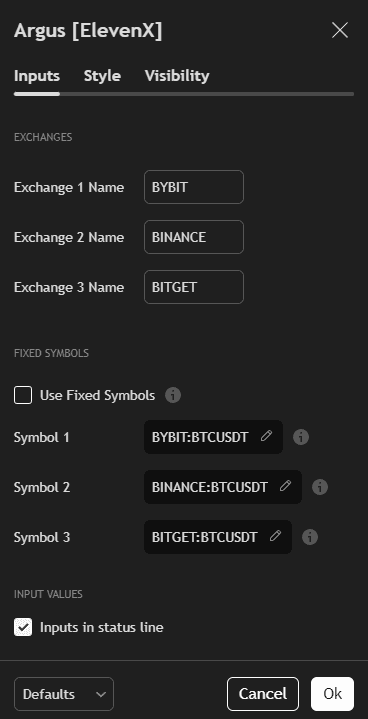
- Exchange Names: Labels used to distinguish each plotted feed (e.g. BYBIT, BINANCE, BITGET).
- Use Fixed Symbols: When enabled, lets you override the default logic and specify exact symbols.
- Symbol 1-3: Format: EXCHANGE:PAIR (e.g. BYBIT:BTCUSDT). Useful for cross-market studies.
- Inputs in status line: Displays input values in the chart status area (optional).
How to Use Argus
- Add Argus to your TradingView chart.
- Configure the exchanges you want to visualize.
- (Optional) Enable "Use Fixed Symbols" for custom market pairs.
- Observe price spreads or arbitrage opportunities between sources.
Argus is perfect for traders who want to compare market structure and execution across different exchanges - all in one view.